
SEO Site Checkup: A Practical Guide to Improving Your Website
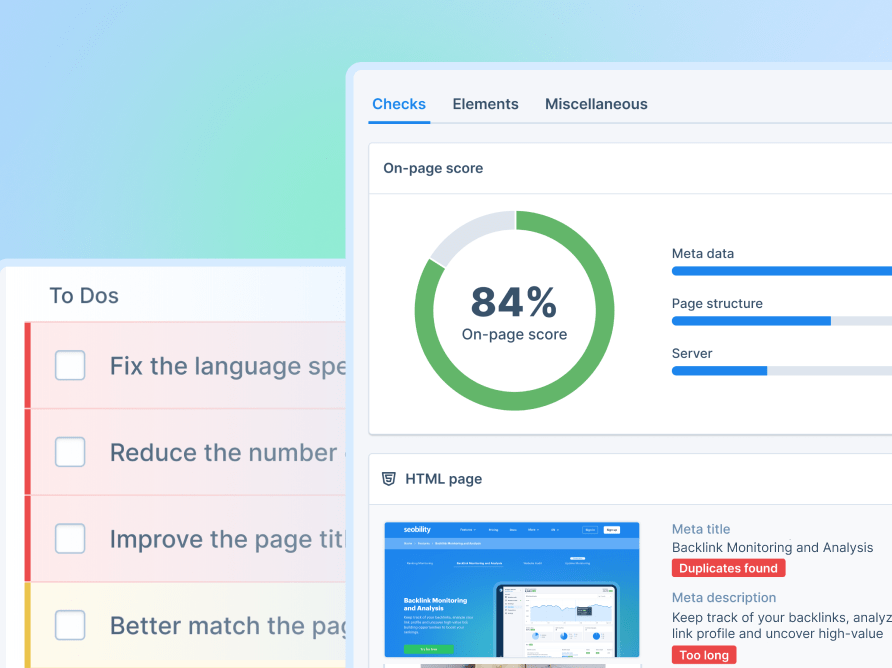
An SEO site checkup is a review of the factors that can affect how well a website is understood by search engines and how easily people can use it. It can reveal technical problems, content gaps and opportunities to improve visibility in organic search.
A checkup is useful for a new website, an established business site or a shop that has seen a drop in traffic. It is not a guarantee of higher rankings, but it gives you a clearer picture of what is working, what needs attention and which changes are worth prioritising.
What does an SEO site checkup cover?
A thorough checkup looks at several connected parts of a website. Reviewing them together is important: excellent content may struggle to perform if search engines cannot access it, while a technically sound site may still fail to answer visitors’ needs.
Technical SEO
Technical checks look at whether search engines can discover, crawl and index the pages you want them to find. Common areas to review include:
- Indexing: Are important pages available to search engines, or are useful pages being excluded?
- Robots directives: Do robots.txt rules and noindex tags block pages unintentionally?
- XML sitemap: Does the sitemap include the correct, canonical URLs?
- Redirects and errors: Are there broken links, unnecessary redirect chains or pages returning errors?
- HTTPS: Is the site served securely, with no mixed-content issues?
- Duplicate URLs: Are multiple versions of the same page competing for attention?
Page speed and mobile usability
People expect websites to load smoothly on phones, tablets and computers. A checkup can identify slow-loading pages, oversized images, intrusive pop-ups or layouts that are difficult to use on a smaller screen. Improving these areas can make a site more comfortable for visitors and support a better overall experience.
Speed tests provide useful clues, but a single score does not tell the whole story. Test important pages on real devices where possible, and focus on issues that affect visitors rather than chasing a perfect number.
On-page SEO
On-page checks assess whether each page clearly communicates its subject and purpose. Review:
- Page titles and meta descriptions
- Headings and page structure
- Descriptive, relevant URL paths
- Image file names and alternative text
- Internal links between related pages
- Content that is clear, useful and relevant to the intended audience
Good on-page SEO is not about repeating a keyword as often as possible. It is about making the page easy to understand and ensuring it provides a helpful answer to the visitor’s question.
Content quality and search intent
A content review asks whether your pages are accurate, original, current and genuinely useful. It also considers search intent: what people are likely hoping to find when they use a particular search query.
For example, someone searching for a service may want pricing, locations and a simple way to enquire. Someone researching a topic may need a clear explanation and supporting evidence. Matching the format and detail of a page to the visitor’s needs can make the content more effective.
Links and site structure
A logical website structure helps visitors find information and helps search engines understand how pages relate to one another. Check that key pages are reachable through clear navigation and relevant internal links. You can also review external links pointing to your site, while treating automated link scores as indicators rather than definitive measures of quality.
How to carry out an SEO site checkup
- Set a goal. Decide what you want to improve, such as organic traffic, enquiries, sales or visibility for a particular service.
- Choose the pages to review. Include your homepage, important service or product pages, and pages that attract or should attract visitors.
- Use reliable data. Combine a site-crawling tool with search performance data and page-speed testing. Each source reveals different types of information.
- Check issues manually. Automated tools can flag potential problems, but they cannot always judge whether content is useful or a recommendation suits your business.
- Prioritise the findings. Start with problems that prevent important pages from being accessed, then address issues affecting usability, content and optimisation.
- Make changes and measure results. Record what you change and monitor relevant metrics over time. Search performance can take time to respond.
Which SEO issues should you fix first?
Not every warning deserves the same level of attention. A practical priority list might look like this:
- High priority: Important pages cannot be indexed, key URLs are broken, or visitors cannot complete essential tasks.
- Medium priority: Slow pages, confusing navigation, duplicate page versions or weak titles on important landing pages.
- Ongoing improvements: Expanding helpful content, refining internal links and reviewing older pages for accuracy.
Consider the likely impact, the number of pages affected and the effort required. Fixing one issue across hundreds of valuable pages may be more useful than polishing a minor detail on a single low-traffic page.
Common mistakes to avoid
- Chasing every audit warning: Some findings are suggestions, not urgent problems.
- Focusing only on scores: A tool’s score is not the same as search visibility, conversions or customer satisfaction.
- Making changes without checking the cause: Altering redirects, indexing settings or canonical tags without understanding them can create new issues.
- Writing for search engines alone: Content should serve real people first and provide a clear, trustworthy answer.
- Expecting instant results: Search engines need time to process changes, and rankings are influenced by many factors beyond your site.
How often should you check your website?
There is no single schedule that suits every website. A small, stable site may need a detailed review a few times a year, while a large shop or frequently updated site may benefit from regular automated monitoring and more frequent checks. It is also sensible to review SEO after a redesign, platform migration, major content update or unexpected change in organic traffic.
Make your SEO checkup actionable
The value of an SEO site checkup lies in what you do with its findings. Use the results to create a manageable list of improvements, assign responsibility and track progress. Combine technical checks with an honest review of your content and visitor experience, and focus on changes that support both your audience and your business goals.
Regular, thoughtful checkups can help you keep your website accessible, useful and ready to adapt as your business and search behaviour evolve.
Comprehensive SEO Site Checkup: Enhancing Technical, Content, and Usability Performance
- Identifies technical SEO issues.
- Highlights content improvement opportunities.
- Checks mobile usability and page speed.
- Helps search engines find important pages.
- Supports informed, prioritised improvements.
Challenges of SEO Site Checkups: Time, Accuracy, and Ranking Uncertainty
- Can be time-consuming to complete.
- Automated tools may flag false positives.
- Does not guarantee higher search rankings.
Identifies technical SEO issues.
An SEO site checkup can uncover technical issues that may make it harder for search engines to crawl, index or understand your website. It can flag problems such as broken links, slow-loading pages, duplicate URLs, missing sitemap entries and incorrect indexing settings. Identifying these issues helps you prioritise fixes, improve the experience for visitors and give important pages a better chance of appearing in relevant search results.
Highlights content improvement opportunities.
An SEO site checkup can highlight content improvement opportunities by showing which pages are outdated, too brief, difficult to navigate or not aligned with what visitors are searching for. It can also reveal missing topics, weak headings and pages that could benefit from clearer explanations or stronger internal links. Use these insights to make your content more useful, relevant and engaging for your audience.
Checks mobile usability and page speed.
An SEO site checkup can highlight mobile usability and page-speed issues that may frustrate visitors, such as slow-loading pages, difficult-to-read text or buttons that are hard to tap. By identifying these problems, you can make your website quicker and easier to use across smartphones, tablets and desktop devices—helping visitors find what they need and supporting a better overall experience.
Helps search engines find important pages.
An SEO site checkup can help search engines discover your most important pages by identifying issues with crawling, internal links and your XML sitemap. When key pages are easy to find and access, search engines can better understand your site and consider those pages for relevant search results.
Supports informed, prioritised improvements.
An SEO site checkup helps you make informed decisions by showing where your website is performing well and where it needs attention. Rather than tackling every issue at once, you can prioritise changes based on their likely impact, urgency and the effort involved. This makes it easier to focus resources on improvements that matter most, track progress and build a clear, practical SEO plan.
Can be time-consuming to complete.
An SEO site checkup can be time-consuming to complete, particularly for large websites with hundreds or thousands of pages. Reviewing technical errors, page content, links and mobile performance takes care, and automated tools may still require manual checks to confirm which issues matter. Without a clear plan, it can be difficult to know where to start or what to fix first, so prioritising the most important problems can help make the process more manageable.
Automated tools may flag false positives.
One drawback of an SEO site checkup is that automated tools can flag false positives: issues that appear problematic in a report but are harmless, irrelevant or already resolved. Tools assess pages using set rules and cannot always understand a site’s purpose or context, so acting on every warning without checking it may waste time or even lead to unnecessary changes. Treat automated results as useful pointers, then verify important findings manually before taking action.
Does not guarantee higher search rankings.
An SEO site checkup can identify technical issues and areas for improvement, but it cannot guarantee higher search rankings. Search results are influenced by many factors, including competition, content quality, user needs and ongoing changes to search engine algorithms. Treat a checkup as a practical guide rather than a promise: acting on its recommendations may strengthen your website, but ranking improvements can take time and are never certain.